
Steam Trade Link: Where to Find Your Trade URL
Your Steam trade link, also called your trade URL, is on Steam's Trade Offers page: open your Inventory, click Trade Offers, then "Who can send me Trade Offers?", and copy the URL under Third-Party Sites. It is safe to share: it lets someone send you a trade offer, and nothing leaves your inventory unless you accept it.
What Is a Steam Trade URL?
Your Steam Trade URL is a unique link that lets platforms like Skinstash.gg send trade offers directly to your inventory. You do not need to add the bot as a friend. It looks like this: steamcommunity.com/tradeoffer/new/?partner=XXXXXXXX&token=YYYYYYYY You stay in full control. Only you can accept or decline offers.
How to Find Your Steam Trade URL?
Fastest Method (Direct Link) Log into your Steam account in your browser. Click this link: steamcommunity.com/id/me/tradeoffers/privacy Scroll down to the Third-Party Sites section. Copy the Trade URL shown in the box.
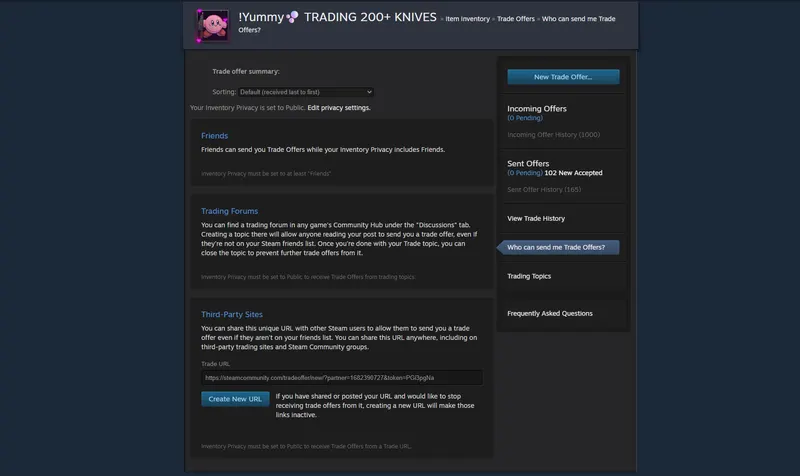
Alternative Method (Through Steam Client)Open the Steam app and go to your Inventory. Click Trade Offers in the top right. Click Who can send me Trade Offers? Scroll to the Third-Party Sites section and copy your Trade URL.
Tip: Click Create New URL if you want a fresh link. This immediately disables the old one.
Is It Safe to Share Your Steam Trade URL on skinstash.gg ? Yes. It is safe when you use it on trusted sites like Skinstash.gg.The URL only allows others to send trade offers to you. Your items remain in your inventory until you accept the trade. You must confirm every trade with Steam Guard. Important safety rules: Only paste your Trade URL on Skinstash.gg and other safe websites (see how to tell a safe trading site) Never share your Steam password, login codes, or API key. Here's how the API scam works. Keep Steam Guard enabled. Generate a new Trade URL if you ever need to.
How to Use Your Trade URL on Skinstash.gg
Go to https://skinstash.gg and sign in with Steam. Go to your profile or settings page. Paste your Steam Trade URL. Start a trade. The bot will send instant offers for the skins you select. This makes item for item trades quick, secure, and simple with low fees.
Pro Tips for Skinstash.gg
Set your Steam inventory privacy to Public (required for bot trading; here's how to make your inventory public). Always review the trade offer before accepting. Start with smaller trades when trying every platform. Create a new Trade URL every few months for added security.
FAQ
Can someone steal my skins with just my Trade URL?
No. They can only send offers. You decide whether to accept. Do I need to add Skinstash.gg bots as friends? No. Your Trade URL is all that is required. More answers on fees, trade holds and safety are in our FAQ.
You now know how to find and safely use your Steam Trade URL. Go to Skinstash.gg, enter your Trade URL, and enjoy secure item for item CS2 skin trading with low fees. Ready to trade? Visit https://skinstash.gg and complete your first bot trade today.